Tuesday, October 13 – The first major update to HyperTexting is now available to download on the App Store. This release is packed full of bug fixes and new features, three of which are highlighted below. Continue reading to learn more, or try it now!
The first major update to HyperTexting is now available to download on the App Store. There are dozens of improvements for posting to HyperTexting websites contained in this release, including profile sync, profile previews, support for editing posts (!), and much, much more. We'll take a deep dive on these features in an upcoming blog post.
For now we want to highlight three new features specifically designed to help make your HyperTexting newsfeed more interactive: Replies, Comments, and Contacts.
Joining the Discourse
I'm very excited to introduce new "Reply" and "Comment" buttons in the HyperTexting timeline.
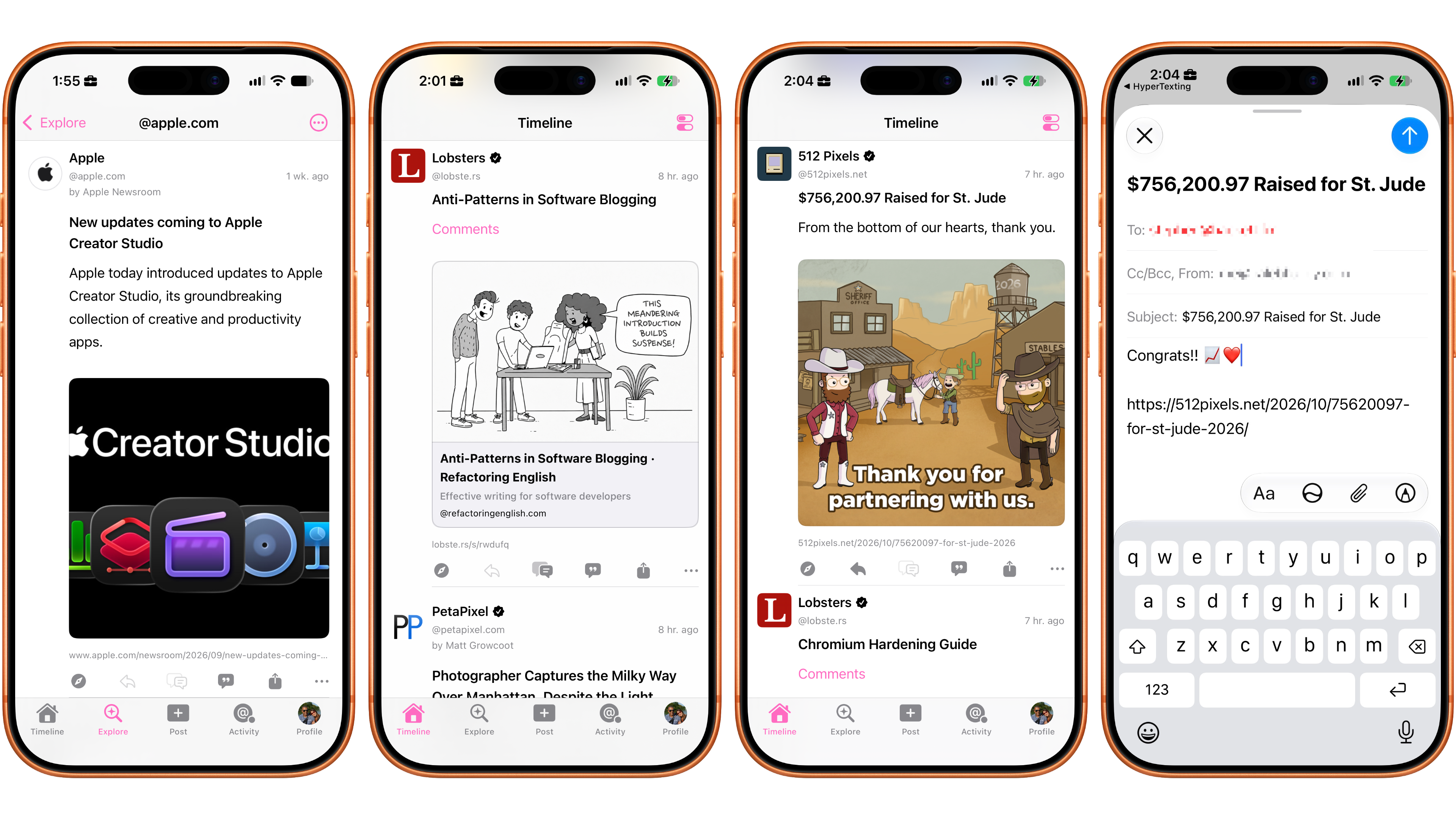
If a feed publishes a contact email address, or if a post has a mailto: comments URL, it will be used for the reply button.
If a post has any other valid comments URL (e.g. a link to a social media post), it will be used for the comments button.
Some feeds will offer replies and comments while others will only offer one or the other.
Some feeds won't provide any way of engaging with their content, and that's okay too!
The thing we love most about this design is: if reply and/or comment buttons are enabled on a post, it's because the author has opted in. In some cases, they are creating space for their community to engage with their content (e.g. via comments). In every case it's because they want to hear from you.
That leads us to the second new feature in HyperTexting: Contacts.
Making Connections
The next features I'm excited to share with you are HyperTexting Contacts and the HyperTexting Contacts Provider.1
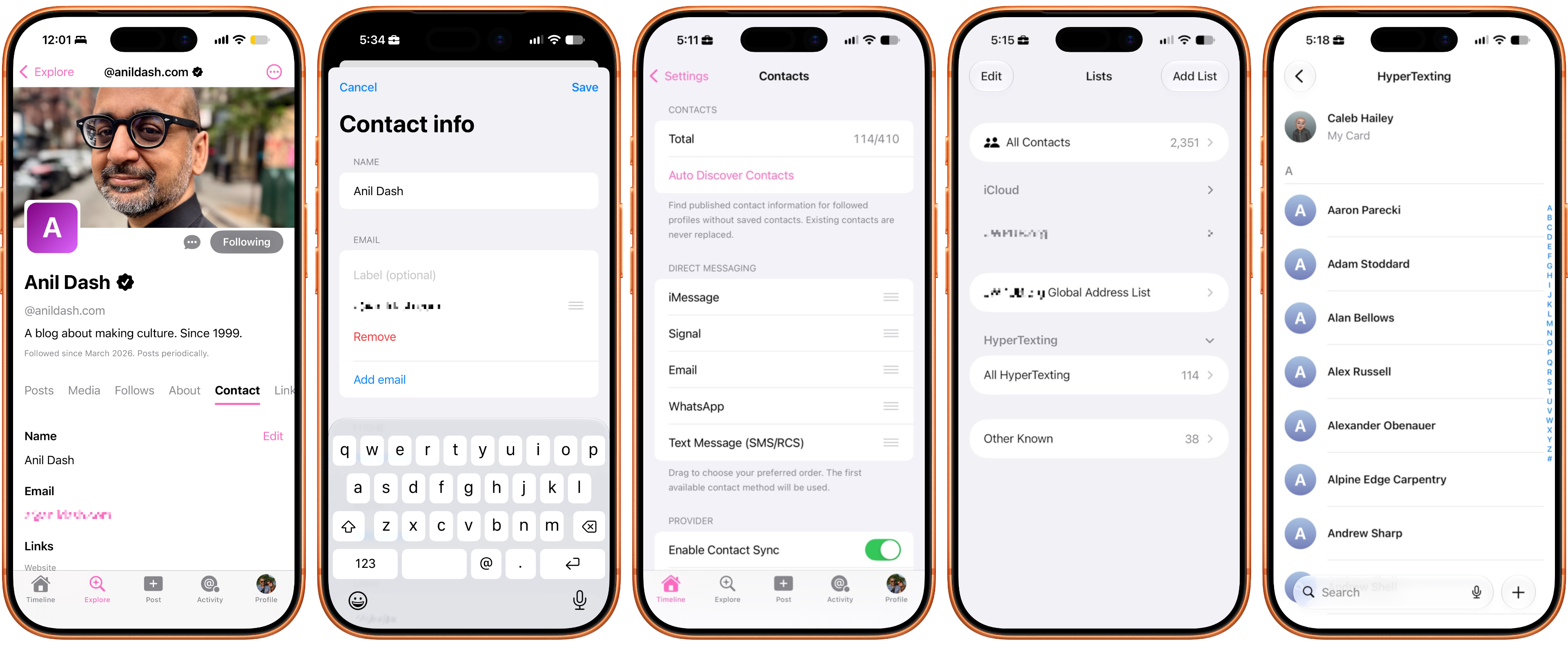
If a website supports @contactspec.org and publishes a contact card at /.well-known/contact.vcf, it will be displayed in the Contact tab of that website's profile.
Users can also manually enter contact information by visiting a Profile, tapping the Contact tab, and tapping "edit".
If a website profile has a contact email address, phone number, iMessage URL, Signal URL, or WhatsApp URL, a new Direct Message button will appear on the profile.
If a website profile has a contact FaceTime URL, a new FaceTime button will appear on the profile.2
Users can configure their preferred Direct Messaging preferences by visiting the Timeline tab → Settings → Contacts and sorting the services. Direct Messaging will always choose the best available messaging service based on your preferences. Finally, if a website profile has a contact email address, it will be used as the default email address for Replies. 💬
As you start making connections you may wish to access HyperTexting Contacts from third-party apps, including Contacts, Mail, Messages, and more. To enable the HyperTexting Contacts provider, tap the Timeline tab → Settings → Contacts → Enable Contact Sync.
Contact Provider Privacy
HyperTexting Contacts are stored 100% on-device, and HyperTexting is an iOS Contact Provider. It has write-only access to your contacts.1
Putting it all together
In "The Open Web's Hidden Social Graph", we introduced Profile "Follows". This made the social graph for the social network otherwise known as the World Wide Web visible. With today's launch of the Profile "About" and "Contact" tabs, we're making that network interactive.
The purpose of a human or computer network is to make connections and share information.
This is evidenced by the ubiquity of website /about and /contact pages.
After all, websites exist to share information and connect people3.
The internet is for people!
The only problem is, even when we do want people to contact us, we don't always make it easy for them to do so.
If I'm following your blog in an app like HyperTexting or @netnewswire.com and I want to respond to a question you've posed, how do I do it?
I have to leave the app I'm using, go visit your website, look for a "Contact" or "About" page, then scan for an email address or other contact information.
Even if you publish your email address, and even if you say "the best way to reach me is ______"4, it might be too late.
Imposter syndrome kicks in.
I'm already starting to feel like a stalker.
"They probably don't care what I have to say."
Meanwhile, the person who published the blog post feels sad that they got so few replies.
Wouldn't it be better if I could just reply directly from my newsfeed? As part of today's launch of the HyperTexting app, we're also announcing a new open-source software project called @socialspec.org. SocialSpec is a collection of APIs for social engagement on the World Wide Web (of websites). It is built 100% on open standards. It is also the secret sauce behind the Profile Follows, About, and Contact features in HyperTexting. We hope other newsfeed apps will join us in supporting these APIs. Together we can help more people escape the algorithm! 🤖
We hope you enjoyed this update, and we can't wait to share what's next! To stay up to date with all the latest HyperTexting news, join the @hypertexting.community 💬 or download the app today and follow us @hypertexting.com.
-
HyperTexting helps you create new contacts instead of harvesting your existing contacts (and asking permission to read your contacts). ↩︎ ↩︎
-
Why FaceTime? Because, unlike phone calls, it's really hard to make spam FaceTime calls.
Video calling is enabled on my profile (@calebhailey.com), and the @herd.works profile. Please feel free to give it a try. If I can't answer, you can leave me a video message, and if you want me to, I might give you a call back! ↩︎
-
those connections could be for the purpose of creating community or conducting business, but at the end of the day the common denominator is people. ↩︎
-
it's probably email. It is literally almost always email.
Email is good! Email gets a bad rap because we don't use it right. It's all marketing and newsletters (most of which we didn't subscribe to). Receiving a personal email from an actual human who typed the message out with their human hands (or dictated it with their human voice) is still a delightful experience in 2026. Don't believe me? Send me an email and I'll send you a reply: [email protected]. ↩︎